MT5 TRADING SOFTWARE

Our algorithms

Compare TCT FUSION, TCT Scalp and TCT Algo. Read how each works, review the MT5 test results and check the risks of changing lot size.

01 / TCT FUSION02 / TCT Scalp03 / TCT Algo
THREE PRODUCTS

Our algorithms

Three distinct products. Clear roles for you and your software.

01 MT5 EXPERT ADVISORCONTINUOUS MT5 AUTOMATION

TCT FUSION

Let TCT FUSION monitor the market and manage trades automatically. Keep your MT5 setup running 24/7, with trading during available market sessions. Explore its promising historical backtest results below; future returns are not guaranteed.

  • Continuous monitoring while MT5 is connected
  • Automated entries and position management
  • Historical MT5 results available to review
Explore TCT FUSION ↗
02 MT5 EXPERT ADVISORM1 / M5 AUTOMATION

TCT Scalp

Short-timeframe automation for M1 and M5 workflows, with rule-based entries and automated position management.

  • M1 / M5 trading workflow
  • Automated entries and management
  • Execution-sensitive, frequent trading
Explore TCT Scalp ↗
03 MT5 EXPERT ADVISORYOUR ENTRY. AUTOMATED MANAGEMENT.

TCT Algo

You analyse the market and select the Buy or Sell entry level. TCT Algo handles configured execution and position management.

  • User-selected Buy / Sell level
  • Stop loss & multiple take profits
  • Order count & lot / risk settings
  • Breakeven & trailing stops
Explore TCT Algo ↗
BACKTEST RESULTS

Performance and lot-size calculator

Choose Progressive Lot or Fixed Lot for each strategy. The original tests use different starting deposits and position-sizing methods; compare their risks as well as returns. Past performance does not indicate future results.

Automated strategy

TCT FUSION

Ask about access ↗
HISTORICAL MT5 BACKTEST · NOT LIVE RETURNS

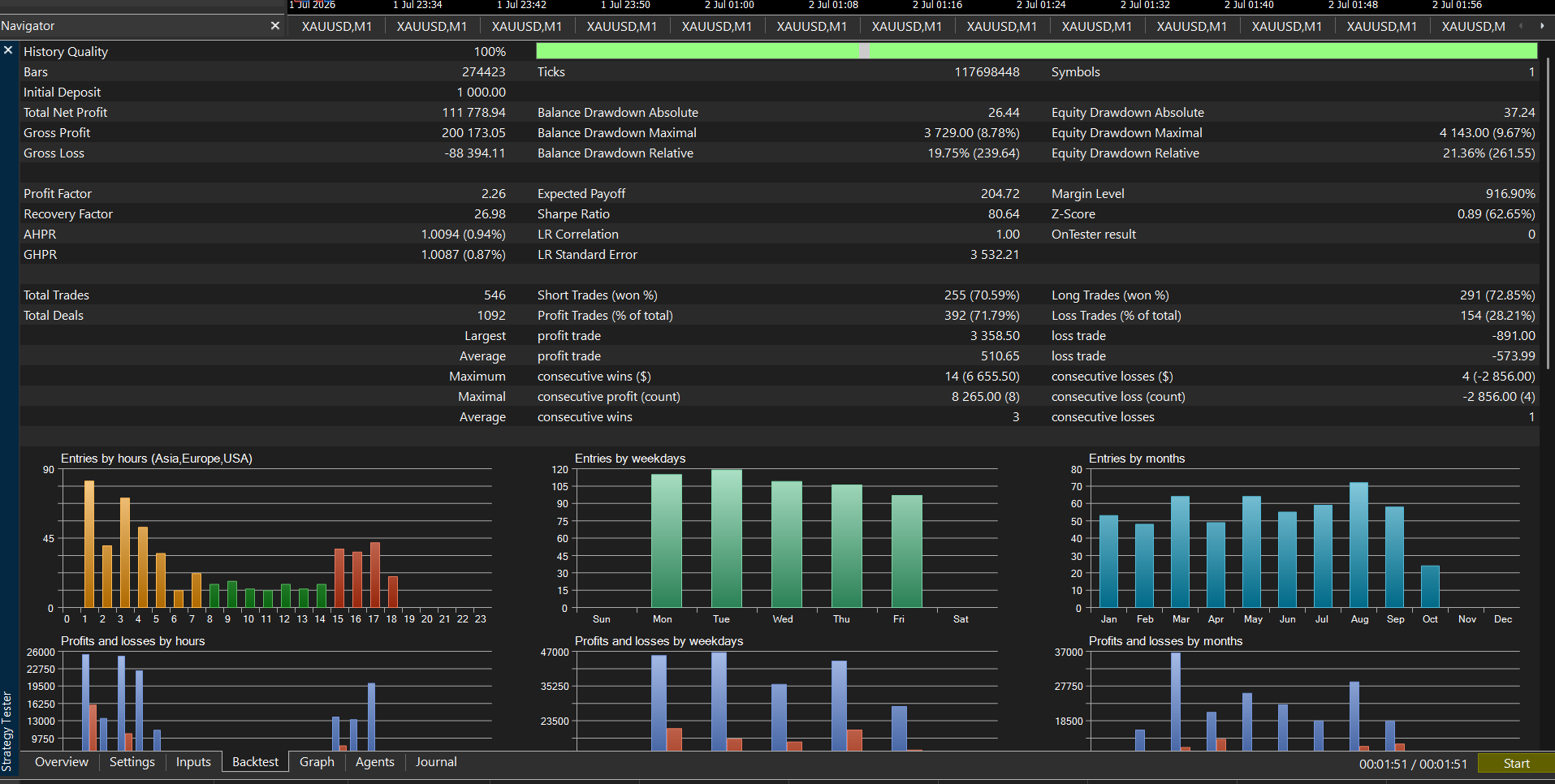
1 Jan–11 Oct 2026 · $1,000 deposit · 0.01 lot per $100 equity · maximum 1.50 lots · USD

Net profit
+$111,778.94
Total trades
546
Winning trades
71.79%
Profit factor
2.26
Relative equity drawdown
21.36%
Max dollar equity drawdown
$4,143.00

Historical MT5 simulation, not independently audited live returns. Progressive tests began with $1,000, whereas fixed-lot tests began with $500. Both use the M1 test period.

TCT FUSION progressive lot: user-supplied MT5 summary charts showing entries and profit/loss by hour, weekday and month
Original user-supplied progressive lot summary screenshot. Select the image to inspect at full size.
View Results →
EXPLORE THE ARITHMETIC

TCT FUSION lot-size illustration

Change the lot size to see how profit and dollar drawdown scale in a simple linear model.

Lot multiplier
1.00×
Theoretical net profit / loss
$961.61
Theoretical ending balance
$1,461.61
Scaled dollar equity drawdown
$27.62

Theoretical arithmetic only — not a backtest, forecast or guaranteed return. Multiplier = selected lot ÷ 0.01; net profit/loss and maximum dollar equity drawdown are multiplied by that factor. Ending balance = scenario balance + scaled net profit/loss. No compounding or new trades are simulated. Relative equity drawdown is not scaled.

This does not prove that a $500 account can sustain higher lots. Margin, leverage, spread, commissions, slippage, liquidity, stop-outs and the sequence of gains and losses can change or prevent these outcomes. Historical drawdown is not a future loss limit. The lot range is an input limit, not a recommendation.

Automated strategy

TCT Scalp

Ask about access ↗
HISTORICAL MT5 BACKTEST · NOT LIVE RETURNS

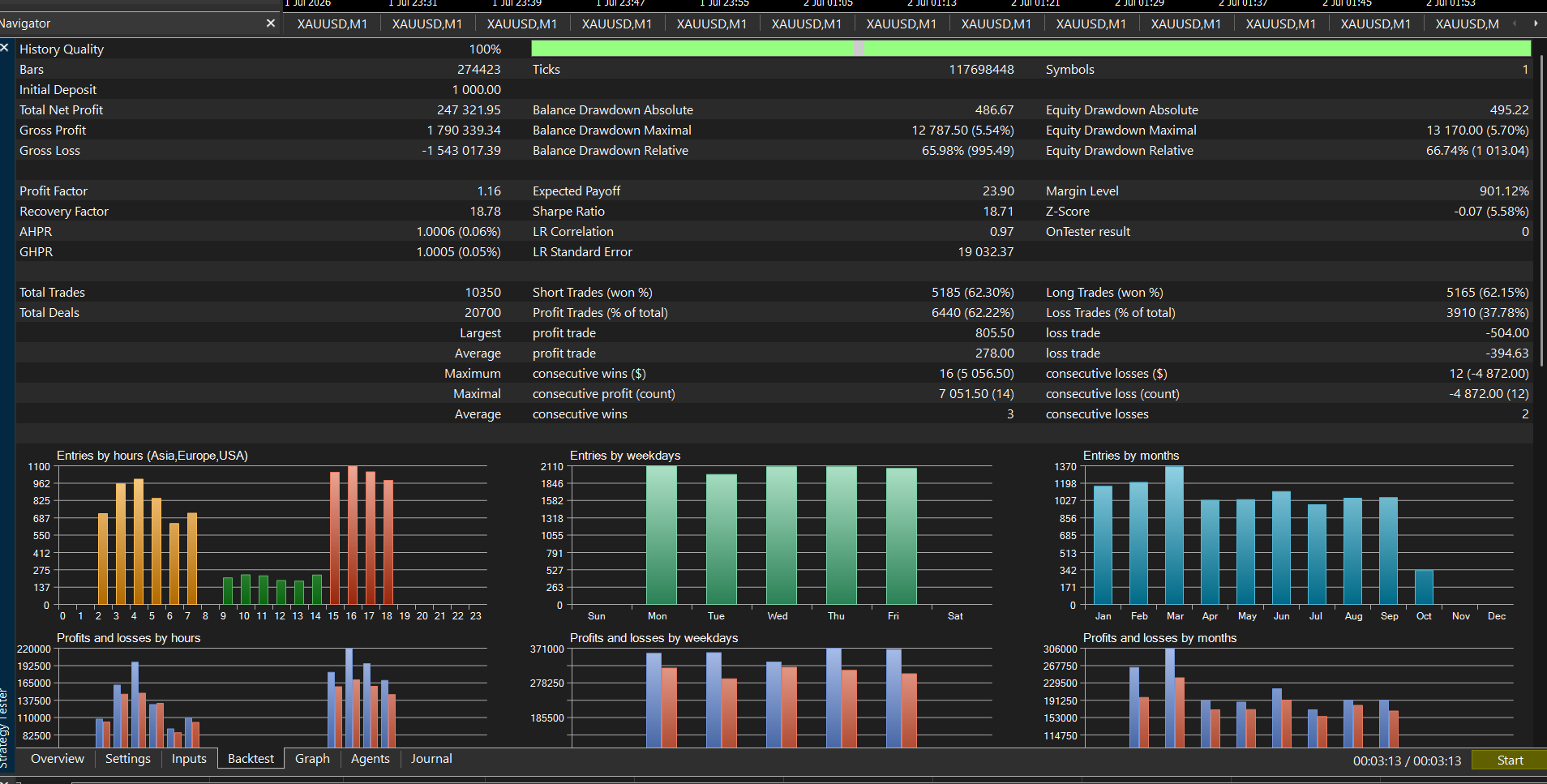
1 Jan–11 Oct 2026 · $1,000 deposit · 0.01 lot per $100 equity · maximum 1.50 lots · USD

Net profit
+$247,321.95
Total trades
10,350
Winning trades
62.22%
Profit factor
1.16
Relative equity drawdown
66.74%
Max dollar equity drawdown
$13,170.00

Historical MT5 simulation, not independently audited live returns. Progressive tests began with $1,000, whereas fixed-lot tests began with $500. Both use the M1 test period.

TCT Scalp progressive lot: user-supplied MT5 summary charts showing entries and profit/loss by hour, weekday and month
Original user-supplied progressive lot summary screenshot. Select the image to inspect at full size.
View Results →
EXPLORE THE ARITHMETIC

TCT Scalp lot-size illustration

Change the lot size to see how profit and dollar drawdown scale in a simple linear model.

Lot multiplier
1.00×
Theoretical net profit / loss
$1,883.35
Theoretical ending balance
$2,383.35
Scaled dollar equity drawdown
$104.56

Theoretical arithmetic only — not a backtest, forecast or guaranteed return. Multiplier = selected lot ÷ 0.01; net profit/loss and maximum dollar equity drawdown are multiplied by that factor. Ending balance = scenario balance + scaled net profit/loss. No compounding or new trades are simulated. Relative equity drawdown is not scaled.

This does not prove that a $500 account can sustain higher lots. Margin, leverage, spread, commissions, slippage, liquidity, stop-outs and the sequence of gains and losses can change or prevent these outcomes. Historical drawdown is not a future loss limit. The lot range is an input limit, not a recommendation.

Trader-directed strategy

TCT Algo

Ask about access ↗
PERFORMANCE STATUS

No published backtest

TCT Algo depends on the entry levels selected by its user. FUSION and Scalp results do not represent TCT Algo performance. Use the calculator with your own baseline for a hypothetical illustration.

View Results →
EXPLORE THE ARITHMETIC

TCT Algo lot-size illustration

Change the lot size to see how profit and dollar drawdown scale in a simple linear model.

No published TCT Algo backtest is available. Enter your own 0.01-lot baseline to explore a hypothetical scenario; these inputs are not verified TCT results.

Enter valid values: lots from 0.01 to 1.00, a positive balance up to $100 million, and a non-negative baseline drawdown.

Theoretical arithmetic only — not a backtest, forecast or guaranteed return. Multiplier = selected lot ÷ 0.01; net profit/loss and maximum dollar equity drawdown are multiplied by that factor. Ending balance = scenario balance + scaled net profit/loss. No compounding or new trades are simulated. Relative equity drawdown is not scaled.

This does not prove that a $500 account can sustain higher lots. Margin, leverage, spread, commissions, slippage, liquidity, stop-outs and the sequence of gains and losses can change or prevent these outcomes. Historical drawdown is not a future loss limit. The lot range is an input limit, not a recommendation.

INSTALLATION

Installing your algorithm

01

Confirm your license

Contact TCT for the selected product, supported broker/instrument setup, eligibility and license terms. Obtain the compiled EX5 file and approved settings through the team.

02

Install in desktop MT5

Open File → Open Data Folder, then MQL5 → Experts. Place the supplied EX5 file there. Refresh Expert Advisors in Navigator or restart MT5.

03

Configure and test

Attach the EA to the instructed chart. Check the supplied settings, lot size, stop loss and permissions. Enable Algo Trading only when ready; first test on a demo account.

04

Monitor your setup

Check the Experts and Journal tabs for errors and license status. Keep MT5 connected. Review margin and exposure; a VPS does not remove trading risk.

TUTORIALS

Product walkthroughs

HAVE YOUR OWN STRATEGY?

Build your own algo.

Share your market, platform, entry and exit rules, position sizing, risk limits, sessions and example setups with TCT for a technical review.

Discuss your requirements ↗

Looking for TCT Auto?

The earlier automation preview remains available through the automation waitlist. FUSION, Scalp and the trader-directed TCT Algo are described individually above; contact TCT to confirm availability.

BEFORE YOU START

Frequently asked questions

How do the three algorithms differ?

TCT FUSION monitors the market and automates entries and position management while MT5 is connected. Your setup can run 24/7; trades depend on available market sessions. TCT Scalp automates an M1/M5 workflow. TCT Algo leaves entry-level selection to you and automates configured execution and position management.

Are the results live or guaranteed?

They are historical MT5 Strategy Tester results for 1 January–11 October 2026. Progressive results (default) began with $1,000 and used equity-step lot sizing; fixed-lot results began with $500 at 0.01 lot. Backtests use historical conditions and assumptions; they do not establish future returns. You can lose capital.

Can I multiply the lot size on a $500 account?

The calculator shows arithmetic, not account feasibility. A larger lot can increase losses and margin requirements and cause a stop-out. A new test with realistic broker conditions and margin modelling is needed to assess a different setup.

Why is there no TCT Algo performance figure?

No corresponding backtest was supplied for this trader-directed product. Outcomes depend on the entry decisions and settings chosen by its user. We do not assign FUSION or Scalp results to it.

How do licensing and access work?

Contact TCT to confirm product availability, eligibility, pricing, license duration, permitted accounts and renewal terms before installation. Do not assume one license covers all three products. Any first-algo offer is subject to team confirmation.

Do I need to keep MT5 running?

For an Expert Advisor to monitor and act on market data, the configured MT5 terminal must remain connected with algorithmic trading enabled. A suitable VPS can support continuous operation; interruptions and broker conditions can affect execution.

What can I share?

View Results opens a public summary page. Share Results shares or copies that page’s URL. The pages show selected performance statistics and public summary reports without order/deal lists, account identifiers or proprietary entry formulas.